Light
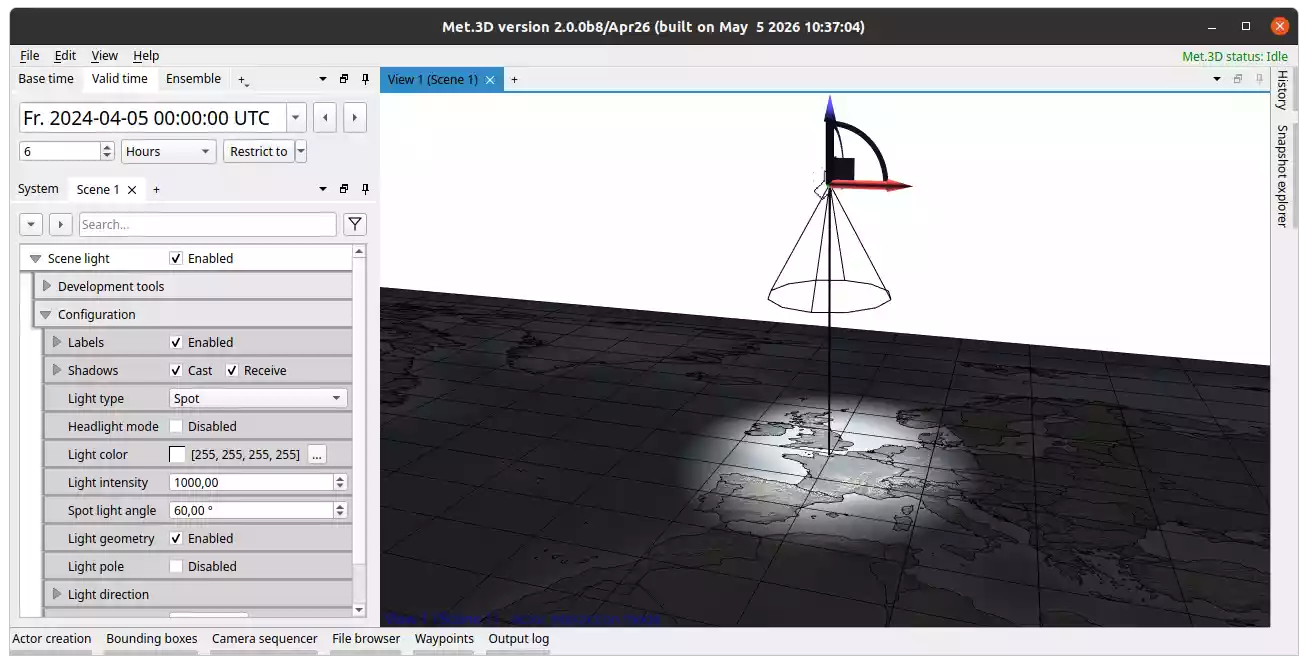
Fig. 20 Light actor set as spotlight with visible gizmo in interaction mode.
Overview
The light actor places a light source in the 3-D scene. Every session includes a default scene light that ensures basic illumination even without adding additional light actors. This default light is also used for shadow mapping.
Four light types are available:
Directional: a light at infinite distance, like the sun. Only direction matters; position has no effect on the illumination.
Point: emits light in all directions from a single point.
Spot: emits a cone-shaped beam of light.
Rectangle: an area light that emits light from a rectangular surface in the direction of its normal.
Configuration
The following properties are shared across all light types under Light → Configuration:
Light type: selects the type (Directional, Point, Spot, Rectangle).
Light color: colour of the emitted light.
Light intensity: strength of the light (default 1.0). Falls off with the inverse square of the distance for non-directional lights.
Headlight mode: attaches the light to the camera of all active views, so it always follows the view direction.
Type-specific properties:
Spot light angle: opening angle of the spotlight cone in degrees (Spot only).
Rectangle light size → Width / Height: dimensions of the rectangular light source (Rectangle only).
Position and Direction
The position and orientation of the light are controlled via the Light direction transform component. In actor interaction mode the light can be repositioned and rotated directly in the scene using the transform gizmo.
Visual Aids
Light geometry toggles the icon sprite and transform gizmo in the scene.
Light pole displays a vertical pole at the light’s position for spatial reference.
Note
Only the default scene light is currently used for shadow mapping. Additional lights influence shading but do not participate in shadow computation.